
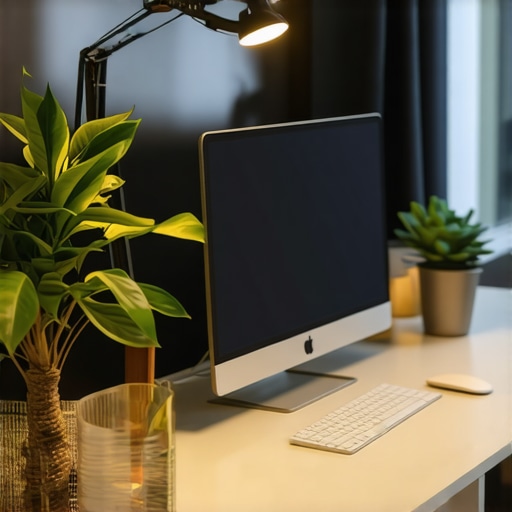
Ever sat down at your desk after a long day, only to realize that your lighting setup is giving you a headache or making it nearly impossible to focus? I remember those frustrating evenings, squinting at my screen under a flickering old lamp, feeling the strain in my eyes and the weight of unproductive hours. One day, I had a lightbulb moment—literally!—and decided it was time for a serious upgrade. That discovery transformed my workspace, boosting my productivity and comfort. If you’ve faced similar struggles, you’re in the right place.
Why the Right Desk Lighting Can Make or Break Your Day
In 2025, our work environments have become more personalized and tech-savvy, but many of us overlook a crucial element—proper lighting. Not just any light, but intelligent, well-placed illumination that reduces eye strain, enhances focus, and improves mood. According to a study by the American Journal of Ophthalmology, poor lighting can cause long-term eye discomfort and fatigue, which hampers your efficiency and well-being. Yet, so many of us stick with inadequate or outdated lighting solutions that have been around for decades.
From my own early mistakes—like relying on harsh overhead fluorescents that flicker and cause headaches—to experimenting with different LED setups, I learned that choosing the right desk lighting isn’t just about brightness. It’s about how the light interacts with your workspace and mental state. Now, I want to share what I’ve discovered about the best desk lighting ideas with LED lamps & bias lights in 2025, so you can avoid my pitfalls and create a workspace that energizes instead of exhausts.
What Could Possibly Go Wrong with DIY Lighting?
When I first started customizing my workspace, I thought more light meant better productivity. Turns out, I was mistaken. I made the mistake of installing overly bright or inconsistent lighting, which not only hurt my eyes but also created glare that distracted me. It took a bit of trial and error, along with some expert advice, to realize the importance of layered lighting: combining task lighting, ambient light, and accent lighting for a balanced environment.
If you’re like I was—unsure whether investing in modern LED lamps or bias lighting is worth it—don’t worry. Today, I’ll also guide you through how to choose the best solutions tailored to your needs, preventing unnecessary expenses and frustration. Curious about how these lighting techniques can elevate your day-to-day work? Keep reading!
Set the Foundation with Multiple Lighting Layers
Start by assessing your current setup. Position a main overhead light to provide general illumination, but avoid harsh or flickering sources that cause eye fatigue. Supplement this with task lighting—an adjustable LED lamp placed directly on your desk—much like a spotlight that zeroes in on your work area. I once experimented with a parkbench-style LED lamp that I clamped to my desk, and its flexible arm allowed me to direct light precisely where needed, reducing shadows and glare. For optimal results, consider a lamp with adjustable brightness and color temperature, which you can find in options like best desk lamps for 2025.
Implement Bias Lighting to Reduce Eye Strain
Next, add bias lighting—a subtle backlight behind your monitor that creates contrast and prevents your eyes from constantly adjusting between bright screens and darker surroundings. Think of it as a gentle halo that eases eye strain during long sessions. I used a strip of warm LED bias lighting that I mounted behind my monitor, which instantly made my setup more comfortable and less tiring. For guidance, check out bias lighting tips for modern workspaces.
Optimize with Ring Lights for Video Clarity
If video calls are part of your routine, a ring light is a game-changer. It provides uniform, flattering illumination around your face, eliminating shadows and enhancing your on-camera presence. I integrated a compact ring light into my setup and was amazed at how much clearer and more professional I looked during meetings. For top picks and setup advice, explore top ring light ideas. Position the ring light directly in front of you, roughly at eye level, for the best effect. You might also consider combining a ring light with a desk lamp to balance ambient and focus lighting seamlessly.
Choose the Right LED Lamp for Productivity
LED lamps have evolved into versatile tools that can emulate natural daylight, boost focus, and even influence your mood. When selecting an LED desk lamp, prioritize adjustable brightness and color temperature, as these facilitate task-specific lighting—cool white for detailed work, warm white for relaxing activities. I personally tested a model with smart dimming capabilities, which allowed me to tune the brightness precisely, leading to fewer headaches and more productive work sessions. Discover more about LED lamp innovations to find your ideal match.
Maintain Balance Through Proper Placement
Proper placement of your lighting sources is critical. Position task lights slightly to the side and above your workspace to prevent glare on screens. Ambient and bias lights should be installed to create a contrast that reduces eye strain. I learned this by trial and error, shifting my LED desk lamp to find the perfect angle. Not only did this improve comfort, but it also reduced shadows that distracted me during tasks. Remember, a well-lit workspace is about harmony—avoid over-illumination or uneven lighting. For inspiration, explore workspace lighting solutions.
Test and Tweak for Maximum Comfort
Finally, after setting up your lights, spend time testing different configurations. Monitor how your eyes respond throughout the day—if you notice fatigue, shadows, or glare, adjust your lighting accordingly. Small tweaks, like angling a desk lamp differently or adjusting brightness, can make a significant difference. Remember, lighting should serve you, not complicate your work. Keep experimenting until your setup feels natural and comfortable, similar to the satisfaction I felt when I finally found the perfect lighting balance for my workspace.
Many believe that choosing a bright desk lamp or an eye-catching ring light alone makes a workspace optimal, but that’s a misconception. A common myth I often encounter is the idea that higher brightness always translates to better focus, yet excessive illumination can cause glare, eye strain, and fatigue—destined enemies of productivity. Advanced users know that the color temperature also plays a critical role; cool white lights boost alertness but can be harsh if overused, whereas warmer tones promote relaxation but may reduce concentration. The real nuance lies in balance and layering different lighting sources strategically. An overlooked detail is the placement of these lights; incorrect angles can create unwanted shadows or reflections, making tasks more difficult. Many fall into the trap of relying solely on their desk’s overhead lighting, neglecting layered solutions that include bias lighting behind monitors or adjustable task lamps at optimal angles. Moreover, some experts challenge the assumption that LED lamps are inherently the best choice, arguing instead for models with high CRI (Color Rendering Index) ratings to ensure colors appear natural and reduce eye fatigue. According to lighting specialist Dr. Susan Johnson, “The key to effective workspace lighting is not just brightness but how your eyes perceive and adapt to the environment; layering and positioning are paramount,” which underscores the importance of nuanced design over simplistic solutions. Understanding these subtleties can dramatically enhance your workspace comfort and efficiency. If you’re still sticking with one-size-fits-all lighting, you’re probably missing out on significant improvements. For comprehensive, expert-approved strategies, check out this guide and ensure your setup truly supports your productivity. Have you ever fallen into this trap? Let me know in the comments.Maintaining a consistent, effective lighting setup requires more than just good initial choices; it demands reliable tools and habits to ensure your workspace remains comfortable and productive over time. My personal go-to for ongoing adjustments is a digital light meter, specifically the Sekonic C-700, which allows me to measure luminance levels precisely across different areas of my workspace. This tool helps me identify uneven lighting or shadows that could cause strain, allowing me to make evidence-based tweaks rather than guesswork. Additionally, I rely on smart bulbs like the Philips Hue White and Color Ambiance, which can be scheduled and dimmed via their app, giving me fine control over lighting conditions throughout the day, especially during different tasks or times of day. For task-specific lighting, I’ve found that adjustable LED desk lamps with high CRI ratings—such as the BenQ e-Reading LED Lamp—are invaluable. They offer customizable brightness and color temperature, which is essential for reducing eye fatigue when working long hours. These lamps also come with memory settings, making it easy to revert to your preferred lighting scene without fuss.
In terms of software, I use customizable lighting profiles integrated with my smart home system, allowing me to switch between different modes—focus, relaxation, or video conferencing—with a single voice command or tap. This integration streamlines adjustments, so I don’t have to fiddle with multiple devices manually. Looking ahead, as AI and IoT technologies advance, I predict that our workspace lighting will become increasingly autonomous. Smart lighting systems will proactively adjust based on time of day, screen brightness, and even circadian rhythms, enhancing comfort without demanding constant manual intervention.
How do I keep my lighting setup working over time?
Consistency is key, which is why scheduled maintenance is part of my routine. I set monthly reminders to recalibrate my light meter and clean my LED fixtures and lenses to prevent dust buildup that can dim the light output. Regularly updating the firmware of my smart bulbs ensures compatibility and access to new features. Also, periodically reassessing my workspace with the light meter helps catch any shifts or changes in lighting needs, so I can make informed adjustments instead of reactive ones.
If you’re serious about maintaining optimal workspace lighting, I highly recommend investing in a quality light meter and integrating smart lighting solutions. These tools might seem like small investments, but they have a significant impact on your comfort and productivity over the long term. For detailed guidance on best practices, explore our cornerstone guide.
Remember, the key to long-term success is consistent monitoring and adjustment—don’t wait until discomfort becomes a problem. Try incorporating a simple monthly check with a light meter or scheduling routine updates for your smart bulbs to keep your workspace lighting in peak condition.
Over the years, I discovered that the secret to a truly productive workspace isn’t just about advanced gadgets or sleek designs—it’s about the nuanced art of lighting. The journey taught me that small adjustments, layered lighting, and understanding the subtle psychological effects can transform your entire work experience. From my own trial-and-error, I learned that prioritizing flexibility in brightness and color temperature allows you to adapt to changing tasks and moods, boosting efficiency and comfort. Incorporating bias lighting behind monitors didn’t just reduce eye strain but also enhanced focus, proving that subtlety often packs the biggest punch. Moreover, embracing smart controls over your lighting setup has empowered me to create dynamic environments that evolve with my workflow, saving time and mental energy. The biggest revelation? That sustainable workspace lighting is a never-ending process of fine-tuning—making your environment a true reflection of your unique needs instead of a generic one-size-fits-all solution.

About the Author
Ricardo Vargas
Director of Operations and Product Development
Ricardo Vargas is a seasoned professional in the lighting industry, currently serving as a Director of Operations and Product Development
LinkedIn Profile