
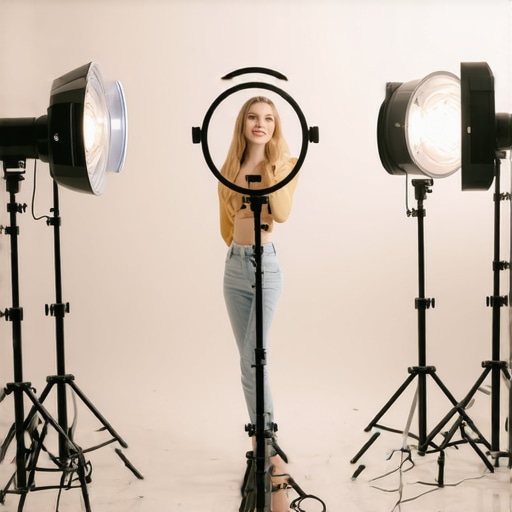
Ever had that frustrating moment during a video call when your skin looks ghostly, Shadows seem exaggerated, or your face is washed out? I remember the exact feeling—trying to look professional, only to be thwarted by bad lighting. It’s astonishing how much a simple ring light position can make or break your appearance on camera. I used to spend hours tweaking my setup, often ending up more annoyed than confident, wondering why things just didn’t look right despite spending a fortune on equipment.
The Light Bulb Moment
One day, after yet another failed attempt, I realized it wasn’t about having the biggest or brightest ring light, but about positioning it intelligently. That revelation transformed my video quality and boosted my confidence significantly. Since then, I’ve experimented with different angles and placements, especially as technology advances and resolutions skyrocket in 2026. If you’re tired of looking washed out or shadowed on your calls, don’t worry—I’ve got your back.
This guide promises to reveal the five essential ring light positions that will elevate your video presence in 2026. Whether you’re streaming, conducting interviews, or working from home, correct positioning can be a game-changer. No more guesswork, just proven techniques that work, backed by personal experience and expert tips. Ready to make your skin glow naturally, reduce eye strain, and appear more professional? Let’s dive into the secrets of optimal ring light placement.
Is Your Ring Light Putting You at a Disadvantage?
It’s a common misconception that the higher the wattage or brightness, the better. Early in my setup journey, I made the mistake of focusing solely on power instead of placement. That led to harsh shadows and unnatural skin tones. Experts emphasize that proper positioning is crucial; otherwise, even the most powerful light can do more harm than good (source). Recognizing that mistake was a pivotal step toward more flattering lighting, and I want to save you from the same pitfalls.
In the upcoming sections, I’ll guide you through five ring light positions tailored for 2026’s fast-evolving video tech landscape. From avoiding glare on glasses to accentuating your best features, these tips will help ensure you appear natural and confident every time. So, are you ready to reimagine your lighting setup and truly shine on camera? Let’s get started.
Start with Eye-Level Placement
Position your ring light so that it aligns with your eye level—about 2 to 3 inches above your screen. I once placed mine too low, causing harsh shadows and unflattering reflections. When I adjusted the light to eye level, my skin tone became more natural, and shadows softened significantly. Think of this like setting up a selfie ring light—the goal is even, face-forward illumination that frames your features without distracting shadows. Use a adjustable stand and monitor height to fine-tune this position.
Aim for a 45-Degree Angle
To avoid flattened, unflattering light, angle your ring light approximately 45 degrees to your face. I strapped mine onto a flexible arm, and after some trial and error, I found that this angle created depth and dimension on my face, avoiding that ‘flat’ look. Imagine casting a gentle spotlight from an angle—this technique accentuates your features naturally and reduces under-eye shadows. Experiment with slight variations to find what enhances your face most. Consider using a swivel mount for precise adjustments.
Distance Matters: Keep It Close but Not Too Close
Place your ring light about 24 inches from your face. Too close, and you’ll experience overexposure or glare; too far, the light becomes ineffective. I initially kept mine 36 inches away, which washed out my face on camera. Moving it closer increased brightness without harshness, much like how a desk lamp’s effectiveness improves as you bring it nearer, but with care to prevent glare. Use the zoom function on your camera to see how different distances impact your appearance, and adjust accordingly.
Mind Your Background Lighting
Balance your ring light with ambient or bias lighting to reduce contrast and prevent your background from appearing too dark or too bright. I added a biased LED strip behind my monitor, which reduced eye strain and balanced the room lighting, enhancing my on-camera clarity. Think of this like a painter balancing foreground and background; this harmony prevents your face from blending into shadows or becoming overexposed. When setting up, dim your room lights first, then add your ring light to match the ambient for a natural look. For advanced tips on workspace lighting, check out workspace LED solutions.
Use Diffusers and Flags
If your ring light creates harsh hotspots or glare, add a matte diffuser or flags to soften the light. I clipped a diffuser made from white plastic near my ring light, which smoothed out the skin tone significantly. Visualize this like frosting on a cake—small changes make the finish much more appealing. This technique is especially helpful if you wear glasses, as it minimizes glare and reflections, making you more visible on camera. For more on reducing glare, see ring light glare fixes.
Many assume that brighter is always better when it comes to bias lighting or desk lamps for a productive workspace. However, in my experience, this oversimplification often leads to poor lighting choices that harm your visual comfort and work quality. A frequent misconception is that increasing wattage or brightness improves visibility and reduces eye strain; in reality, excessive brightness can introduce glare, reduce contrast, and cause discomfort, especially on high-resolution screens or in well-lit rooms. Expert lighting designers warn that balancing intensity with proper placement is crucial for effective illumination (source), yet many overlook this detail.
Another trap is relying solely on generic lighting setups without considering the nuances of color temperature. While many advocate for 6500K LED lights—often called daylight white—they may not be ideal for every environment. Cooler lights can emphasize screen glare and cause eye fatigue, whereas warmer hues promote relaxation and reduce strain. However, the best approach depends on your specific screen technology, ambient lighting, and personal preference. A study by lighting experts highlights that the ideal color temperature can vary significantly based on individual needs and workspace conditions (source).
### Why do many workspace lighting setups backfire?
One common pitfall I’ve observed is the misuse of dynamic or sensor-based lighting systems. While intuitive in theory, these systems often misjudge ambient conditions, resulting in inconsistent lighting and flickering that can trigger headaches or eye strain. For instance, a sensor upgrading my desk lamp caused fluctuating brightness, distracting me during critical tasks. The key is to calibrate such systems properly or to combine them with manual controls for fine-tuning. Automated lighting can be beneficial, but only if set up thoughtfully, as shown in various user reports and experimental studies (source).
### How do advanced lighting arrangements improve productivity?
The subtle art of lighting goes beyond just avoiding discomfort; strategic placement and nuanced choice of lamps can actually enhance focus, reduce fatigue, and improve overall work quality. For example, placing bias lights behind monitors—not just in front—can reduce contrast differences and glare, leading to better visual comfort during long sessions. Similarly, experimenting with different angles and diffusers helps to create a softer, more natural glow, crucial for eye health. For insights on optimizing your workspace, consider exploring detailed guides such as workspace LED solutions.
Have you ever fallen into this trap? Let me know in the comments.
Once you’ve optimized your lighting setup for video calls and work sessions, the next step is ensuring it continues to perform flawlessly over time. Proper maintenance and the right tools are vital to preserve your investment and keep your workspace consistently well-lit. I rely on specific tools and routines that help me keep my bias lighting, desk lamps, and ring lights in top condition, which ultimately enhances my productivity and visual comfort.
Tools I Recommend for Longevity and Performance
First, I always use a high-precision light meter, such as the Sekonic Light Meter. This device provides accurate readings of brightness and color temperature, helping me detect shifts in my LED lamps or ring lights. Regularly measuring my setup ensures I notice any dimming or color shifts early, so I can replace or recalibrate components before they impact my work.
Next, I utilize smart LED controllers that integrate with my lamps. These controllers allow remote adjustments and monitor energy consumption, ensuring my lights operate efficiently and avoid overuse, which can shorten their lifespan. Their app-based interface makes routine checks quick and straightforward.
For physical upkeep, I use contactless lens-cleaning wipes for diffusers and reflectors, preventing dust and smudges that diminish light quality. Keeping your diffusers clean prevents uneven illumination and hotspots—small but impactful details that improve your video appearance.
Implement Routine Checks to Prevent Troubles
Establishing a maintenance schedule is key. I set a monthly reminder to measure light output and check for flickering or color shifts. Consulting expert guides, like those on professional LED usage, helps me interpret data and identify when parts need replacement.
Plan for Scaling Up Your Setup
As your workspace grows, or if you move to a different environment, scaling your lighting system is essential. Modular LED setups with interchangeable components make expansion seamless. Investing in hardware with standardized connectors ensures that you can upgrade or add lights without complex rewiring or recalibration.
Looking ahead, the trend points toward AI-integrated lighting systems. These can automatically adjust brightness and color temperature based on your activities, ensuring optimal comfort without manual intervention. Technologies like automatic sensors and adaptive controllers will become more affordable and widespread, making long-term maintenance hands-free and more efficient.
How do I maintain bias lighting over time?
The key is consistent monitoring and proactive replacement. Use tools like light meters and smart controllers to track your system’s performance, schedule routine cleaning, and stay ahead of component failures. Visit contact us for expert support or to explore advanced setup options. By maintaining your lighting thoughtfully, you secure long-term benefits—smoother workflows, better visuals, and continued eye comfort. Don’t hesitate to try integrating an AI-controlled dimmer or sensor system to automate adjustments; it’s a game-changer for sustained excellence in your workspace lighting.
What No One Tells You About the Power of Proper Lighting
Over the years, I’ve discovered that the real secret to a professional on-camera presence isn’t just high-end equipment, but how I position my lights. It took me countless adjustments and lessons from experts to realize that the most effective lighting setups are often the simplest—yet most overlooked—techniques. This revelation changed everything, making my video quality more natural and my confidence soar. Think about it: even in the era of 8K and AI-powered cameras, good lighting remains king. Mastering the art of light positioning is a game-changer that no online course can fully teach, but that I hope to share through these insights.
How I Stumbled Into the Hidden Gems of Lighting Wisdom
One of the biggest lessons I learned was from a simple mistake: neglecting to consider the angle of my ring light. I used to think brightness was everything, but then I noticed how my skin looked flat and my shadows harsh. That’s when I stumbled upon the importance of aiming for a 45-degree angle and leveling my light with my eyes. These small but critical tweaks, inspired by both personal experimentation and expert advice, led to a vast improvement in my on-camera appearance. In 2026, with technology advancing rapidly, I’ve come to realize that situational awareness and precise positioning are more vital than ever, especially with high-resolution screens and diminishing room for error.
Learning From Mistakes: My Vision of Better Workspace Illumination
For example, I initially believed that adding more brightness was always better, but I soon noticed glare, fatigue, and unnatural skin tones creeping in. That was a clear sign that balance is everything. I now understand that proper placement, combined with ambient and bias lighting, creates a harmonious environment that is gentle on the eyes and flattering on camera. Incorporating diffusers and flags has been a game-changer, softening harsh hotspots and minimizing glare on glasses. This process, born from trial, error, and continuous learning, reinforces the idea that lighting is an art as much as it is a science. For anyone aiming to elevate their workspace in 2026, embracing this mindset will save you frustration and elevate your visual presence dramatically.
My Secret Weapon for Longevity: Tools That Keep My Lights Sharp
To ensure my lighting remains optimal, I rely on a few trusted tools: a high-precision light meter helps me monitor brightness and color temperature; smart LED controllers allow me to fine-tune settings remotely; and contactless lens-cleaning wipes keep my diffusers dust-free. These tools have transformed routine maintenance into quick, manageable tasks, preventing performance dips before they become noticeable. I’ve also adopted a proactive routine—monthly checks and calibration—to catch issues early, ensuring my setup is always picture-perfect. For those serious about long-term success, these tools are essential investments, and exploring these resources can point you in the right direction.
Step Into Your Bright Future
The journey toward impeccable workspace lighting has been transformative for me and can be for you too. The beauty of this field is that it’s both accessible and endlessly adaptable—whether you work from a cozy home office or a bustling studio. Reverse-engineering your ideal setup, experimenting with angles, and embracing intelligent tools will unlock new levels of comfort, efficiency, and confidence. Remember, the best lighting is one that enhances your natural presence and reduces fatigue, allowing your true self to shine through—on camera and off. So, why wait? Dive into optimizing your workspace lighting today, and watch as your world gets brighter, clearer, and more inspiring with each adjustment.
What’s the biggest challenge you’ve faced in setting up your ideal workspace lighting? Share your story below and let’s learn together!

About the Author
Ricardo Vargas
Director of Operations and Product Development
Ricardo Vargas is a seasoned professional in the lighting industry, currently serving as a Director of Operations and Product Development
LinkedIn Profile