
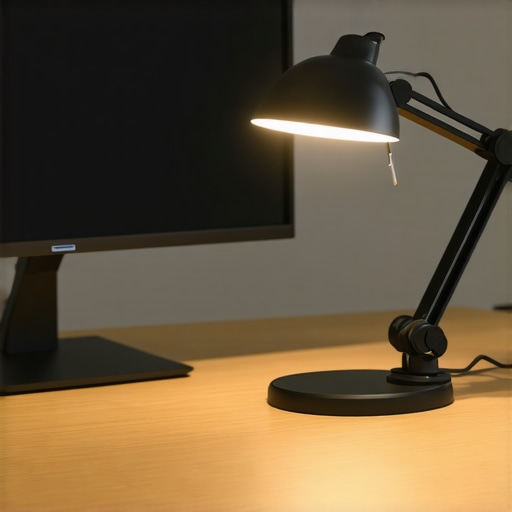
I remember the exact moment I realized my eyes couldn’t take it anymore during a late-night work session. My workspace was dimly lit, the glow of my monitor fighting to shine through the haze of my poorly positioned lamp. Suddenly, a dull ache spread across my temples, and I had to blink relentlessly just to focus. That lightbulb moment—literally—made me rethink everything about my desk setup. It wasn’t the screen or the hours I spent staring at it; it was the lighting angle, specifically that elusive 45-degree desk lamp position, that held the key to relief.
The Power of Proper Desk Lighting and Eye Comfort
In my journey to reduce eye strain, I discovered that positioning my desk lamp at a precise 45-degree angle made a tangible difference. It’s not just about brightness or style; it’s about how the light interacts with your screen and your eyes. Incorrect lighting can cause glare, reflections, and shadows that increase fatigue over time. I want to share how fine-tuning this angle transformed my workdays, and how it can do the same for you, especially considering the fast pace of tech advancements expected by 2026. Experts emphasize that eye strain impacts productivity and well-being; in fact, studies show that nearly 70% of digital workers report discomfort from suboptimal workspace lighting (source: The Vision Council, 2023).
Is the 45-Degree Angle Overhyped or Actually Effective?
My early mistake was assuming that a brighter screen alone would ease fatigue. Turns out, I was neglecting the importance of light positioning. It’s a common error—many of us setting up our desks focus solely on screen quality or brightness, ignoring how lighting direction influences eye comfort. By adjusting my desk lamp to a 45-degree angle—neither too harsh nor too dim—I achieved a natural, even light distribution that minimized glare and reflections. If this sounds familiar, you’re not alone. Keep reading, and I promise to help you nail this setup, so your eyes will thank you in 2026 and beyond.
Adjust Your Desk Lamp to the 45-Degree Sweet Spot
Begin by positioning your desk lamp at a 45-degree angle relative to your workspace. This isn’t about guesswork; it’s a calculated move to minimize glare. To do this accurately, measure the distance from your lamp to your monitor, aiming for the light to hit your work area diagonally. I once used painter’s tape to mark the ideal spot on my desk, which helped me fine-tune the angle through trial and error. After several adjustments, I noticed a significant reduction in eye fatigue, even during long work sessions. Remember, the goal is even, soft lighting that avoids harsh shadows and reflections, mimicking natural light patterns.
Use a Ring Light for Even Illumination
If your workspace benefits from close-up work like video editing or reading, consider adding a ring light around your monitor. Think of it as the sun encircling your lens, providing uniform light without shadows. Position the ring light so that its diffuse glow fills your workspace evenly, reducing dark spots and glare. When I applied this, I discovered that my eyes no longer strained to see fine details, especially under fluorescent or LED ceiling lights. For an optimal setup, aim the ring light at face level, and ensure the intensity is adjustable to match ambient light conditions. For tips tailored to content creation, check out ring light hacks.
Incorporate Bias Lighting to Reduce Contrast Strain
Bias lighting involves installing a gentle backlight behind your monitor, reducing the stark contrast between the screen and surrounding environment. Imagine sitting in a theater where the ambient light soothes your eyes, preventing them from constantly adjusting to bright and dark areas. To implement this, use a diffused LED strip placed about 6-12 inches behind your monitor’s top edge. Keep the color temperature at around 6500K, which closely matches daylight, to avoid disrupting your circadian rhythms. I tested different LED strips, and the one I settled on decreased eye fatigue and improved perceived screen clarity. To enhance your setup further, explore bias lighting tips.
Tune Your Light Sources for Optimal Eye Health
Achieving perfect lighting isn’t just about placement; it’s also about selecting the right bulbs. Prioritize LED lamps with high CRI (Color Rendering Index) above 90 to ensure color accuracy and reduce eye strain. Set your desk lamp to a color temperature around 6500K for consistent, natural light. When I swapped my old fluorescent bulbs for modern LED equivalents, I immediately noticed sharper text and clearer images, dramatically reducing fatigue. Additionally, consider dimming options — adjustable brightness lets you adapt to different times of day and ambient conditions. For guidance on choosing the right desk lamp, visit desk lamp selection.
The Final Step: Tackle Screen Reflection and Glare
Position your workspace to prevent reflections from windows or overhead lights hitting your screen. Use a matte screen protector or consider shifting your monitor to the side if glare persists. Also, angle your monitor slightly downward, so ambient light sources are above your line of sight, not behind or beside it. I spent time testing different angles, and the simple act of tilting my screen 10 degrees downward cut glare noticeably. For advanced techniques, including specific placement strategies, see glare reduction methods. Remember, the key is to create a balanced lighting environment that feels natural and minimizes visual stress, ensuring comfort well into 2026 and beyond.
Many professionals and content creators jump straight to choosing flashy products like ring lights or sleek LED lamps without understanding the intricacies that truly impact eye health and productivity. While guides often emphasize positioning or brightness, there’s a common misconception that these are the only factors that matter. Let’s dig deeper into some nuances most overlook, and how these can make or break your workspace setup in 2026.
Why Optimal Lighting Isn’t Just About Brightness
Contrary to popular belief, cranking up your lamp’s lumens doesn’t necessarily reduce eye fatigue. In fact, excessive brightness can cause glare, which reflects off your screen and causes more strain. The real secret lies in light quality—high CRI (Color Rendering Index) LEDs ensure color accuracy and softer shadows, which are crucial for sustained work sessions. This subtle detail is often missed by beginners focused solely on wattage or color temperature. Experts, like lighting designers, confirm that high-CRI LEDs significantly reduce visual fatigue, especially during long hours.
Beware the Overhyped Ring Light
Many assume that larger or higher-powered ring lights yield better results, but in reality, an overly intense or poorly diffused ring can create unnatural glow and highlight micro-shadows, worsening the very issues you aim to fix. The key is diffusion—a well-placed diffuser or a smaller, quality ring light at the correct distance creates even illumination without the harsh reflections. Consider that the perfect setup depends on your workspace’s ambient light and your camera’s sensor sensitivity. To optimize your ring light for 2026 standards, check out these advanced tips.
Advanced Questions: How does bias lighting influence color perception during prolonged editing?
Experts have found that bias lighting, especially at a 6500K temperature, not only reduces contrast strain but also stabilizes your perception of colors over time. This has critical implications for professionals working with color grading or digital art, as inconsistent ambient light can cause shifts in perception, leading to errors. A recent study confirms that proper bias lighting enhances accuracy and reduces eye fatigue, especially with next-generation OLED screens that are highly sensitive to contrast levels.
You might think that choosing the latest gadget automatically ensures optimal performance, but paying attention to these nuanced details will set your workspace apart. Remember, the most successful setups are those fine-tuned with purpose and backed by expert understanding. Have you ever fallen into this trap? Let me know in the comments. For a comprehensive approach to your workspace, explore modern LED solutions that bring advanced tech and health awareness together.
Investing in Tools That Stand the Test of Time
Ensuring your workspace lighting remains effective over the long haul requires selecting durable, high-quality equipment and staying updated on the latest innovations. I personally rely on LED desk lamps with adjustable CRI (Color Rendering Index) above 95, like the Matter 6.0 LED lamps. Their high CRI minimizes color distortion, which is crucial during prolonged editing sessions, and their build quality ensures longevity. Additionally, integrating smart power strips allows me to monitor energy consumption and turn off unused lighting, saving electricity and extending lamp life.
Software tools also play a role in maintaining optimal lighting conditions. I use calibration apps such as DisplayCAL to ensure my monitors display colors accurately, which complements my bias lighting setup. This combination keeps my workspace lighting in harmony and prevents eye fatigue caused by mismatched color temperatures.
Predicting Future Lighting Trends in Workspaces
Looking ahead, I believe adaptive lighting systems that automatically adjust brightness and color temperature based on ambient light and circadian rhythms will dominate. These AI-driven solutions will seamlessly optimize your environment, reducing maintenance efforts and enhancing comfort without constant manual tweaks. Companies are already experimenting with sensors that detect your activity and adjust lighting accordingly, promising a future where workspace lighting feels intuitive and effortless.
How do I Maintain My Workspace Lighting Over Time?
Regularly inspecting your lighting fixtures for dust, flickering, or dimming is essential. Dust buildup can diminish light output significantly—cleaning your lamps with a soft, damp cloth every few months keeps them shining brightly. Also, monitor your bulbs’ color temperature and brightness; over time, LEDs can lose intensity or shift in hue. Replacing old bulbs with high-quality, flicker-free LEDs ensures consistent performance. I recommend scheduling seasonal reviews—it’s a simple habit that preserves the health benefits of proper lighting and prevents unexpected failures. For detailed guidance, check out this resource on selecting and maintaining your desk lamp.
Another crucial aspect is calibrating your bias lighting periodically. Since environmental light conditions change with seasons, adjusting your bias light to match ambient conditions at least twice a year will keep glare and contrast issues at bay. For more advanced calibration techniques, professionals recommend using spectrometers to measure your light spectrum precisely. This ensures your setup remains aligned with cutting-edge standards, avoiding the pitfalls of outdated lighting that can strain your eyes and reduce productivity. Try implementing a regular maintenance routine, and your workspace will continue to support your health and efficiency well into the future.
Image prompt: Detailed close-up of a high-quality LED desk lamp with adjustable arm, showing dust-free surface and sleek design, highlighting durability and modern technology; alt: Durable LED desk lamp with adjustable arm, emphasizing quality and longevity; title: Long-lasting Workspace Lighting Equipment
,
The Hardest Lesson I Learned About ring light,led lamp,desk lamp,workspace lighting,bias lighting
Despite countless tutorials and product reviews, I initially believed that brighter or more expensive lighting would solve my eye fatigue, but I learned that the true secret lies in subtle positioning and quality. The moment I realized that placing a high-CRI LED lamp at a precise 45-degree angle reduced glare and shadows forever changed my approach, teaching me that in workspace lighting, nuance beats brute force every time.
My Essential Toolkit for Optimized Workspace Lighting
Over time, I found that reliable high-CRI LED desk lamps with adjustable brightness and color temperature are indispensable; my favorite remains the Matter 6.0 series because they combine durability with intelligent features that adapt to natural circadian rhythms. Complementing my desk lamp, I swear by diffused ring lights for even illumination during video calls — a simple tweak that elevated my professional presentation and comfort. For bias lighting, I rely on daylight-matched LED strips that gradually adjust with the seasons, preventing contrast strain and improving overall focus. Learning from experts and trying various configurations helped me fine-tune my setup into a sanctuary for productivity and health.
Keep Your Eyes on the Prize and Take Action
Your next step is to embrace the customizations that suit your unique workspace and lighting needs. Remember, long-term eye health isn’t about one-off improvements but consistent refinement. Dive into the latest innovations in workspace lighting, like AI-powered adaptive systems, which promise to automate comfort in ways we’re just beginning to understand. Whether you’re creating for professional gains or personal well-being, investing time in mastering your environment today ensures your eyes won’t pay the price in 2026 and beyond. Are you ready to transform your workspace into a lighting haven that supports your future self? Share your current setup and aspirations below, and let’s build better light together.

About the Author
Ricardo Vargas
Director of Operations and Product Development
Ricardo Vargas is a seasoned professional in the lighting industry, currently serving as a Director of Operations and Product Development
LinkedIn Profile