
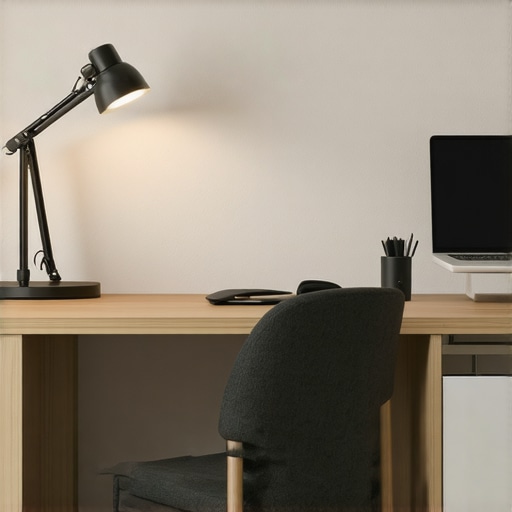
I still vividly remember the moment I realized my beloved LED desk lamp was causing more harm than good. It was late at night, and I was squinting fiercely at my screen, fighting a headache that refused to go away. After hours of frustration, I noticed something strange—the light source was just slightly off-center, directly on my right side. Suddenly, it clicked. That tiny misalignment was messing with my vision and productivity more than I ever expected.
Shining a Light on the Common Pitfall
Ever since, I’ve been obsessed with optimizing my workspace lighting, and I want to share a crucial insight I wish I’d known earlier: **Your 2026 LED lamp should never sit on the right side of your workspace**. It might seem trivial at first, but trust me, the placement of your lighting can drastically impact your eye health, focus, and even your mood. It’s a small setup detail, but it’s one that many overlook, leading to unnecessary eye strain and fatigue over time.
Is Your Workspace Setup Broken?
Now, I’m not writing this to give you superficial advice. Early in my setup journey, I made a critical mistake—placing my lamp erratically without considering how light hit my face and screen. That misstep not only made my eyes tired faster, but it also affected my ability to concentrate during long work sessions. If you’ve faced similar issues, know this: your lamp’s position might be sabotaging your productivity without you realizing it.
Recent studies highlight how proper lighting can boost alertness and reduce fatigue—something I now swear by. According to a report by Lighting Research Center, correct light placement can improve visual comfort and cognitive performance. So, it’s time to look at your desk setup with fresh eyes and an open mind.
Get Ready to Transform Your Workspace Lighting
In the sections ahead, I will walk you through simple yet effective steps to ensure your LED lamp’s placement enhances your workspace rather than hinders it. Ready to ditch those annoying headaches and boost your productivity? Let’s get started by understanding why the right setup matters—starting with a critical mistake I made early on that many still do today.
.
Position Your Lamp for Maximum Comfort
The first crucial step is to place your LED desk lamp on the **opposite side of your dominant hand**—if you’re right-handed, position it on the left, and vice versa. I once tried setting my lamp on the right, thinking it would improve illumination, but soon noticed increased eye strain and uneven shadows. Moving it to the left instantly balanced the light, reducing glare and making my work more comfortable.
Align Light to Minimize Screen Glare
Ensure your lamp directs light **away from your screen**, preventing reflections and glare. Use adjustable arms or goosenecks to fine-tune the angle. For example, I adjusted my lamp so that the light hits my desk at a downward angle, which eliminated unwanted reflections and bright spots on my monitor. To learn more about positioning, visit this guide.
Control Light Intensity and Color
Choose a lamp with adjustable brightness and color temperature. I experimented with different settings, starting with a neutral 4000K, but found that a warmer 3500K reduced eye fatigue during prolonged hours. Implementing dimmable LED lamps allows dynamic control, matching natural light cycles. This is similar to how new LED innovations enhance workspace comfort.
Use Bias Lighting to Balance Brightness
Adding a bias light behind your monitor helps balance the luminance around your workspace. I installed a subtle strip behind my monitor, which improved contrast perception and reduced eye strain. Check out this article for tips on choosing the right bias lighting setup.
Experiment with Different Lamp Types
While traditional desk lamps work well, consider ring lights or panel lights for uniform illumination. During a messy setup attempt, I replaced my standard lamp with an adjustable ring light, which provided even, shadow-free light ideal for video calls and detailed work. For inspiration, visit this resource.
Ensure Proper Height and Distance
The height of your lamp should be approximately at or slightly above eye level. I initially placed my lamp too low, causing harsh shadows; raising it about 15 inches above my workspace made a noticeable difference. Maintain a distance of about 16-24 inches from your eyes for optimal comfort. To avoid common pitfalls, see these fixes.
Implement a Routine for Adjustments
Regularly review and tweak your lighting setup, especially as daylight changes. I set a monthly reminder to assess glare, shadows, and brightness, ensuring sustained comfort. Small adjustments, like damping your lamp’s brightness in the evening, help maintain eye health and productivity over time.
Many people believe that simply choosing a bright LED desk lamp or installing a ring light guarantees optimal workspace illumination, but in reality, there’s a lot more beneath the surface that often goes unnoticed. A common myth is that brighter always means better; however, overly intense lighting can lead to eye fatigue and reduced focus, especially when the color temperature isn’t adjusted correctly. Experts emphasize that **not all lighting is created equal**, and the quality, placement, and spectral composition play vital roles in creating an effective workspace.
One trap many fall into is relying solely on brightness levels without considering the **color rendering index (CRI)**. A high CRI, typically above 90, ensures that colors appear natural and reduces eye strain during prolonged work sessions. Skimping on this detail can make tasks like color matching or reading subtle text more difficult and tiring. That’s why choosing LED lamps with proper spectral qualities, as discussed in this article, can dramatically improve visual comfort.
How Can Advanced Lighting Choices Improve Focus and Sleep?
Let’s dig deeper into the sophisticated aspects—like the timing and spectral tuning of your lighting setup. Many overlook that **adjusting spectral output according to the time of day** significantly impacts both alertness and circadian rhythms. For instance, cooler blue-enriched lights boost focus during the day but can hinder melatonin production if used in the evening, impairing sleep. Conversely, warmer tones promote relaxation, prepping your body for rest. Properly integrating bias lighting behind screens, and adjusting color temperatures dynamically, enhance comfort and health. As highlighted in this source, the key is in customization and timing.
Failure to optimize spectral composition and timing can turn your workspace into a visual minefield. Advanced solutions like smart lighting systems that sync with your circadian rhythm are emerging—are you leveraging these innovations? If not, you might be missing out on enhanced productivity and health benefits. Have you ever fallen into this trap? Let me know in the comments.
Maintaining your workspace lighting setup is crucial for sustained productivity and eye health. Over time, even the best LED lamps and accessories can degrade or become misaligned, diminishing their effectiveness. Personally, I rely on a combination of specific tools and regular routines to ensure my lighting remains optimal. One essential tool I swear by is a digital lux meter, such as the LX1010B, which allows me to measure illumination levels precisely across different zones of my desk, ensuring consistent lighting conditions. This helps me identify uneven brightness or shadows that may cause eye strain, prompting targeted adjustments.
Another vital aspect is software control for dynamic lighting. I use a smart control system integrated with my LED desk lamp via the app-enabled settings to schedule brightness and color temperature shifts throughout the day. This automation not only promotes circadian health but also prolongs the lifespan of my equipment by preventing unnecessary overuse. Investing in high-quality, adjustable fixtures with long-term durability features, such as those discussed in this article, ensures your setup remains reliable over years.
Routine maintenance also involves cleaning and inspecting components. I recommend gentle wiping of lens covers with microfiber cloths and checking connections monthly to prevent dust buildup or loose bulbs that can diminish light output. Additionally, replacing worn-out cables with quality options reduces flickering issues discussed in this guide.
How do I keep my workspace lighting working flawlessly long-term?
Regular calibration using measurement tools, updating firmware if available, and scheduling periodic evaluations ensure your lighting remains effective and safe. Embracing advanced solutions like smart lighting systems that sync with circadian rhythms, as highlighted in this resource, can set your workspace apart and future-proof your setup. I encourage you to try implementing a monthly lux measurement routine with your current fixtures—it’s a game-changer for consistency and health. Staying proactive with maintenance will help you enjoy the benefits of your carefully curated lighting setup without interruption or deterioration.
Less is More: The Unexpected Power of Subtle Adjustments
One of the most eye-opening lessons I’ve encountered is how tiny tweaks in lamp placement or color temperature can make a profound difference. I used to believe that bright, overwhelming light was the secret to productivity, but I learned that gentle, well-placed illumination actually reduces fatigue and enhances focus. Sometimes, introducing a softer bias light behind my monitor transformed my entire workday, proving that minimalism often outperforms excessive brightness.
My Go-To Tools for a Flawless Luminosity
Over the years, I’ve curated a set of tools that keep my workspace lighting at its best. A digital lux meter helps me measure and fine-tune light levels, ensuring consistency across my desk. I trust the LX1010B because it provides precise readings, preventing shadows or glare that can strain my eyes. For adjusting my lighting dynamically, I rely on smart controls integrated with app-enabled systems. Combining these tools ensures my setup remains optimal, supporting both my health and productivity.
Illuminate Your Path Forward with Confidence
Taking charge of your workspace lighting isn’t just about immediate comfort—it’s an investment in your long-term well-being and effectiveness. The journey to perfect lighting isn’t a one-time setup; it’s an ongoing process of learning and adaptation. Remember, small, intentional adjustments can lead to extraordinary improvements. So, test different placements, try new color temperatures, and consider incorporating innovative solutions like circadian-tuned lights. Your workspace can evolve into a sanctuary of focus and comfort, lighting your way to success. Are you ready to make your lighting work harder for you? Share your experiences or questions below!

About the Author
Ricardo Vargas
Director of Operations and Product Development
Ricardo Vargas is a seasoned professional in the lighting industry, currently serving as a Director of Operations and Product Development
LinkedIn Profile